Notion’s CSV export vs Excel Exporter for Notion
Notion’s CSV export is free, on every plan, and enough for a small table without relations. Excel Exporter for Notion is for when the file has to work in Excel straight away: typed cells, relations as names, colours kept, and several views in one workbook.
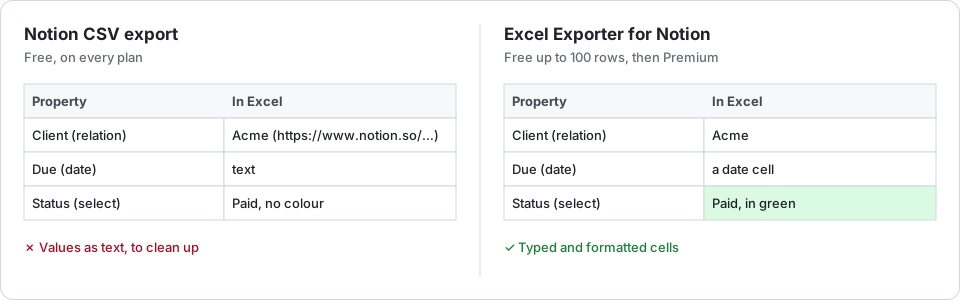
Side by side
| Need | Excel Exporter for Notion | Notion’s CSV export |
|---|---|---|
| Price | Free up to 100 rows per sheet; Premium $9 a month or $99 a year | Better: Free, on every plan |
| Setup | Connect Notion once and choose what it may read | Better: None |
| File | .xlsx | CSV inside a zip |
| Relations | Better: Titles, optionally linked, or IDs in a column | “Title (URL)” for each related page |
| Dates and numbers | Better: Date cells; numbers in their Notion format | Text as Notion displays it |
| Colours and bold | Better: Kept | Lost |
| Views | Better: Any view, with its filter, sorts and columns; several per workbook on Premium | The current or the default view, one per export |
| Page bodies | A column in the sheet, on Premium | A Markdown file per page, free |
| Your data | Read by our servers; the file is deleted after 7 days | Better: Goes straight from Notion to you |
When the CSV is enough
A one-off export of a small table, no relations, and you only need the values: use Notion’s export. It costs nothing, needs no connection, and the overview shows how to open it in Excel without mangling accented characters.
When it is not
When the file goes to someone who will sort, total or pivot it; when relations should read as names; when a report is built from several views; or when the same export comes back every week. The free plan shows the result on your own database before you pay anything.
Try it on your own database
Free for up to 100 rows. No credit card. You choose which pages and databases to share on Notion’s consent screen.
Questions
Is Notion’s CSV export really free?
Yes. Markdown & CSV export is available on every Notion plan, including the free one. Only some options, such as including subpages, are limited to Business and Enterprise.
Does Excel Exporter for Notion change anything in my workspace?
No. The connection is read-only. It reads only the pages and databases you share with it on Notion’s consent screen, and can be revoked from Notion’s settings at any time.
Can I compare the two on my own database?
Yes. The free plan exports the first 100 rows of any database or view with every formatting feature, so you can open both files side by side.