Get a Notion database into Power BI
Power BI has no built-in Notion connector. You can load the CSV export and clean it in Power Query, call Notion’s API from Power Query, or load an Excel table whose columns are already typed — the least work when you do not need a live connection.
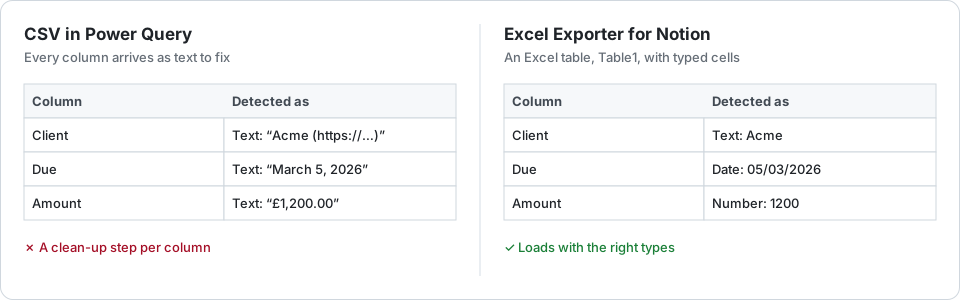
Two free routes
The CSV. Export the database as Markdown & CSV and load it with Get data → Text/CSV. Power Query then has to repair what the CSV lost: relations written as “Title (URL)”, dates in Notion’s display format, amounts with their currency symbol. Each repair is a step you write once — until someone adds a property. The relations and dates guides have the formulas.
The API. Power Query can call Notion’s query endpoint with Web.Contents and an integration token, 100 rows per request, following the cursor. Community connectors wrap the same calls. You get a refreshable source, at the price of parsing Notion’s JSON for every property type, and a token kept in the report.
A typed Excel table
Excel Exporter for Notion writes each sheet as an Excel table — Table1, Table2 and so on — with typed cells: dates as dates, numbers as numbers, checkboxes as TRUE/FALSE, relations as the related pages’ titles. In Power BI, choose Get data → Excel workbook and tick the table rather than the sheet; the types come through without a clean-up step.
Pick “No table style” and the sheet is a plain range instead, so leave a style on. On the free plan a watermark sits above the table, which ticking the table leaves out.
On Premium a related database can be a second table in the same file. Relations arrive as titles, so join the two on the title column, which works when titles are unique.
The catch: a file is a snapshot. Refreshing the report means a new export. On Premium a saved preset can run on a schedule and email you the link; saving the file over the old one lets Power BI refresh from it.
Try it on your own database
Free for up to 100 rows. No credit card. You choose which pages and databases to share on Notion’s consent screen.
Questions
Does Power BI have a Notion connector?
Not a built-in one, at the time of writing. People use the CSV export, Notion’s API through Power Query, a community connector, or a paid data pipeline.
Is this a live connection to Notion?
No. Each export is a file, a snapshot of the database when it ran. For a live source, call the API from Power Query; for a regular snapshot, a Premium schedule emails you a fresh file.
Why pick the table rather than the sheet in Power BI?
The table holds only the header and the rows, with their types. The sheet also holds anything above the table, such as the free plan’s watermark.