Export Notion relations without the URLs
Notion’s CSV export writes every related page as its title followed by its URL in brackets, and has no setting to leave the URL out. You can strip it with a formula property or a find-and-replace in Excel, or export the titles directly.
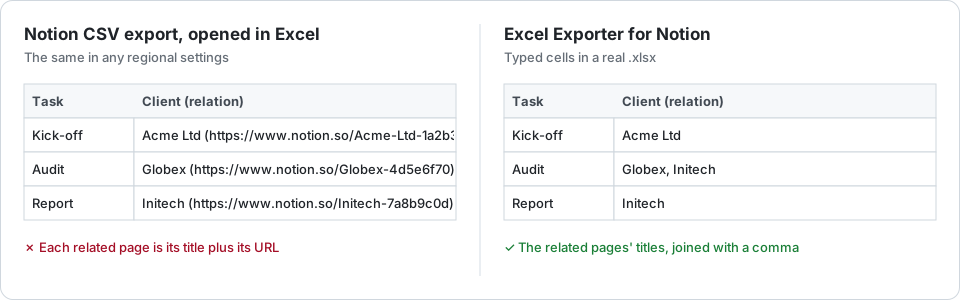
Why the URLs are there
In the CSV a relation cell reads Acme Ltd (https://www.notion.so/Acme-Ltd-1a2b…), repeated for every related page and separated by commas. Notion adds the link because a title alone is not unique: two pages can share one. Asked on Notion’s own forum whether the export can leave it out, the answer was “what you have is what you export”.
Free fix 1: a formula property
Next to the relation, add a formula property that lists the related pages’ titles. With Notion’s current formula language, for a relation called Client whose database’s title property is Name:
prop("Client").map(current.prop("Name")).join(", ")
Hide the relation itself in the view, then export the current view. The formula column holds plain titles.
The catch: one extra property per relation, in every database you export, kept in step whenever a property is renamed. It gives you the title and nothing else of the related page.
Free fix 2: find and replace in Excel
Select the column, press Ctrl+H, find (https://www.notion.so/*) and replace it with nothing.
The catch: Excel’s * wildcard can match from the first bracket in a cell to the last, so in a cell holding several related pages it may take the titles in between with it. Check those cells by hand, and repeat the whole thing on every export.
Titles straight from the export
Excel Exporter for Notion looks up every related page and writes its title, joined with a comma when there are several. Relations with more than 25 pages, where Notion’s API stops listing, are read in full. Sub-items come out the same way, since a parent item is a relation too.
A relation column can be written three ways, and you choose per export:
- Titles, the default.
- Titles with a link back to the page in Notion. A cell holds one link, so only a cell with a single related page becomes a hyperlink.
- Titles plus an ID column, for lookups that must not depend on a title staying unique.
If the related database has not been shared with the connection, its titles cannot be read: the export writes page IDs instead and says so before it runs, rather than leaving you to find out in the file.
Try it on your own database
Free for up to 100 rows. No credit card. You choose which pages and databases to share on Notion’s consent screen.
Questions
Why does Notion put URLs in relation columns?
Because a title alone is not unique: two related pages can have the same name, and the URL tells them apart. Notion’s CSV export has no option to leave it out.
Can I keep a link to the related page?
Yes. Choose titles with a link, and a cell with one related page becomes a hyperlink to that page in Notion. A spreadsheet cell holds only one link, so a cell with several related pages keeps their titles; add the ID column if you need every reference.
What if the related database is not shared with the connection?
Its titles cannot be read, so the export writes the page IDs instead and warns you before it starts. Share the related database with the connection in Notion and export again.