Export the content of Notion pages, not just their properties
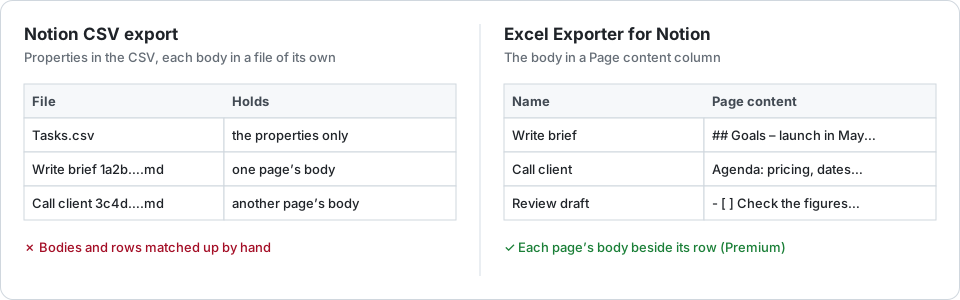
Notion’s CSV export holds a database’s properties only; the text inside each page comes out as a separate Markdown file beside it. You can match the files to the rows yourself, or export each page’s body as a column of the same sheet.
The free route
Export the database with ••• → Export → Markdown & CSV. Notion writes the table as a CSV and, in the words of its help centre, “Markdown files for each subpage”: one file per row, named after the page’s title.
To see a page’s text next to its row you then match files to rows yourself, with Power Query’s From Folder or a short script. That works, with catches:
- Files are matched by name, so two pages with the same title are where it goes wrong.
- An Excel cell holds at most 32,767 characters; a long page has to be cut anyway.
- It is a one-off. Next month’s export is the same job again.
Page content as a column
On Premium, Excel Exporter for Notion can add a Page content column: each row’s body, read through Notion’s API, in the same sheet as its properties. Choose Markdown to keep headings, lists and links as Markdown syntax, or plain text to strip the syntax for reading and searching.
It costs one API call per row, so it is off until you switch it on, and the estimate shown before you export includes it. At Notion’s pace of about three requests a second, a 1,000-row database takes around six minutes more.
A body longer than Excel’s cell limit is cut with a visible “… [truncated]” marker and the sheet says so. A page Notion will not return leaves its cell empty with a warning; the export carries on.
On the free plan you can choose the column, but its cells stay empty, and a warning says so before you export.
Export page content as a column with Excel Exporter for Notion
- Connect Notion and share the database with the connection on Notion’s consent screen.
- Pick the database or one of its views.
- Under the options, set Page content to Markdown or Plain text, and check the estimate.
- Export, then download the .xlsx: the Page content column is the last one.
Try it on your own database
Free for up to 100 rows. No credit card. You choose which pages and databases to share on Notion’s consent screen.
Questions
Does Notion’s CSV export include the page body?
No. The CSV holds the properties. With the Markdown & CSV format, each page’s body is a separate Markdown file in the same zip.
Is page content available on the free plan?
No. It is a Premium option because it costs one API call per row. On the free plan the column is exported empty, and a warning says so before you export.
What happens to a very long page?
An Excel cell holds at most 32,767 characters. A longer body is cut, ends with “… [truncated]”, and the sheet carries a warning.
Markdown or plain text?
Markdown keeps headings, lists and links as their Markdown syntax, which another tool can read back. Plain text removes the syntax, which is easier to read in a cell and to search.