Export a Notion invoice database to Excel
An invoice tracker in Notion holds what the CSV export handles worst: amounts in a currency format, issue and due dates, and a relation to the client. The free route needs three clean-up steps in Excel; the exporter writes amounts, dates and clients the way an accountant expects them.
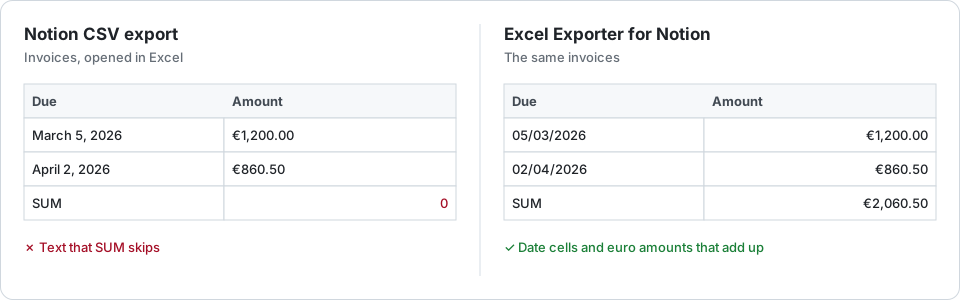
The free route
Export the invoices view as Markdown & CSV, open it with Data → From Text/CSV, and then:
- Amounts. If they arrive with the currency symbol, as text, remove the symbol with Find and Replace and set the column to Number.
- Dates. Convert the issue and due dates with DATEVALUE or Power Query, as the dates guide shows.
- Clients. Strip the “(https://www.notion.so/…)” after each name, as the relations guide shows.
Done once, that is fine. Done every month for your accountant, it is the same job again.
An invoice sheet that adds up
- Amounts are numbers in their Notion format: a euro property becomes a euro number format, a percentage a percentage, so SUM, SUMIFS and pivot tables work straight away.
- Issue, due and paid dates are date cells, so days overdue is a subtraction from TODAY().
- The client is the client’s name.
- Status keeps its Notion colour: paid in green, overdue in red, if that is how you set it.
- A formula property such as “Total incl. VAT” arrives as its number, never as an Excel formula.
Pick the view with this quarter’s filter and the file matches what you see in Notion. On Premium, a saved preset can run on the first of each month and email you the link.
The exporter only reads: it does not create invoices, PDFs or entries in Notion.
Try it on your own database
Free for up to 100 rows. No credit card. You choose which pages and databases to share on Notion’s consent screen.
Questions
Do currency amounts stay numbers?
Yes. Each number property keeps its Notion format as an Excel number format, so a euro amount is a number displayed in euros. Notion sets the format per property, so each column has one currency.
Can the export run every month on its own?
On Premium, yes: a saved preset can run daily, weekly or monthly and email you the download link. Each run is a new file with the rows as they are then.
Are formula totals exported as Excel formulas?
No. A Notion formula is exported as its result, typed: a number stays a number and a date a date. No Excel formula is ever built from your data.