Export one Notion view to Excel
Notion’s CSV export gives you the view you have open, or the database’s default view, one per export. To get a specific view into Excel with its filter, sorts and column order, export it while it is open — or pick it by name in the exporter.
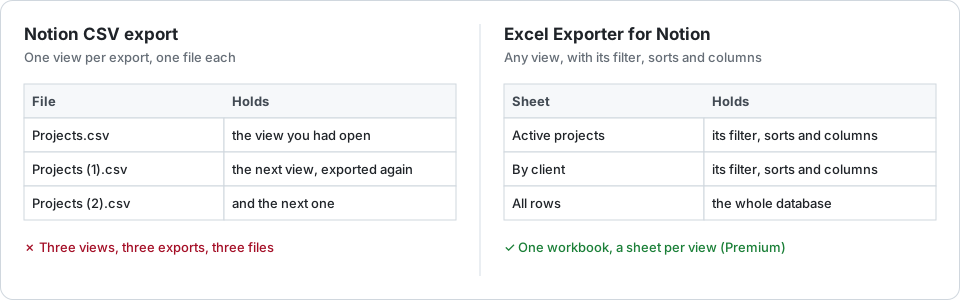
The free route
Open the view, choose ••• → Export → Markdown & CSV, and export the current view. The CSV follows the view’s filter; Notion has applied view filters to exports since 2022.
The catch:
- One view per export. A report built from three views is three exports and three files to stitch together.
- A linked database on another page is a common case of the export coming back with no CSV in it at all.
- It is still a CSV: relations as URLs, dates as text, no colours, as the overview explains.
Pick the view instead
In Excel Exporter for Notion every database lists its views by name. Choose one and the export inherits:
- its filter, whether set in the filter bar or as an advanced filter;
- its sorts;
- its column order and its hidden columns, for a table view.
You see twenty real rows in the view’s order before you export, and the view does not have to be open anywhere. Past Notion’s 10,000-row query limit the export keeps reading, so a large view is exported whole.
A board, calendar or gallery view keeps its filter and sorts, but a sheet is a flat table: the property a board groups by is an ordinary column, and the columns follow the database’s default table.
Notion does not describe every view through its API. When it will not say what a view filters by, the view is marked rather than exported as if it had no filter.
Several views in one file
On Premium, each view of a database can become its own sheet of one workbook, so the weekly report that used to be three exports is one download. The free plan writes one sheet per file.
Export a Notion view to Excel with Excel Exporter for Notion
- Connect Notion and share the database with the connection on Notion’s consent screen.
- Open the database in the list and pick the view you want by its name.
- Check the preview: twenty real rows, filtered and sorted as the view is, in its column order.
- Export, then download the .xlsx.
Try it on your own database
Free for up to 100 rows. No credit card. You choose which pages and databases to share on Notion’s consent screen.
Questions
Does Notion’s CSV export respect view filters?
Yes, for the view you export: Notion has applied view filters to CSV exports since 2022. It exports one view at a time.
Can I put several views in one Excel file?
On Premium, yes: each view becomes its own sheet of one workbook. The free plan writes one sheet per file.
Are board groups kept?
Not as groups. A sheet is a flat table, so a board view exports its rows with the view’s filter and sorts applied, and the property it groups by is an ordinary column.