Export a large Notion database to Excel
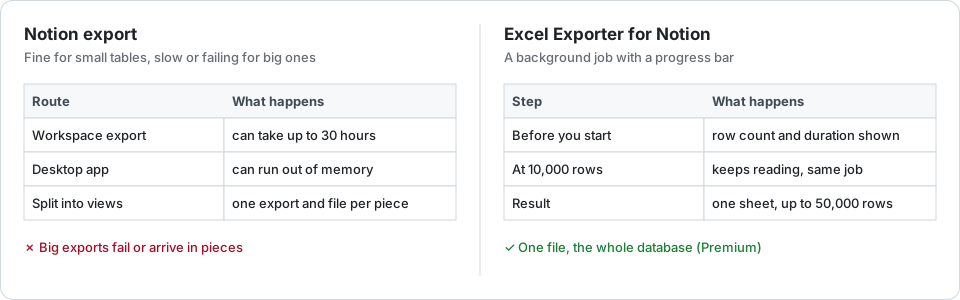
Notion’s own export copes badly with big databases: the desktop app can run out of memory, and a workspace export can take hours. Splitting the database into filtered views keeps each export small; the exporter reads the whole database as one background job instead.
The free route
Export the database page on its own, from the browser rather than the desktop app, and not the whole workspace: Notion’s help centre warns that a workspace export can take up to 30 hours. Setting Include content to exclude files and images keeps the zip small.
If it still fails, split it. Make filtered views — by year, by status, by owner — export each one, and stack the CSVs in Excel with Power Query’s Append. The catch: every piece is its own export and its own file, and each still has the CSV’s problems, described in the overview.
One job, the whole database
Excel Exporter for Notion reads the database through Notion’s API, 100 rows per call, as a background job with a progress bar. Nothing depends on your laptop staying awake: close the tab and the file waits in your export history for 7 days.
Notion’s API stops a single query at 10,000 rows. The export notices and carries on from where it stopped, so a 30,000-row database comes out whole. You see the row count and an estimated duration before you start; plain rows take seconds per thousand, relations and page content add to that.
The limits, stated plainly:
- Premium writes up to 50,000 rows per sheet. The free plan writes the first 100, with a watermark.
- Past 10,000 rows a view’s own sort cannot be kept: the rest arrive in creation order, the only order the API can continue in. Sort the sheet in Excel afterwards.
Try it on your own database
Free for up to 100 rows. No credit card. You choose which pages and databases to share on Notion’s consent screen.
Questions
Why does Notion’s export fail on big databases?
The export is built in one go, and a large one can exhaust the desktop app’s memory or take hours. Notion’s help centre says a workspace export can take up to 30 hours.
How many rows can I export?
Up to 50,000 rows per sheet on Premium. The free plan writes the first 100 rows of each sheet, with a watermark. Excel itself allows just over a million rows.
Is my view’s sort kept past 10,000 rows?
For the first 10,000 rows only. After that the rows follow their creation order, which is the only order Notion’s API can continue from. Sorting the finished sheet in Excel fixes it.
Do I have to keep the page open while it exports?
No. The export runs on our servers. The download link appears in your export history, where the file stays for 7 days.