Get Notion dates into Excel as real dates
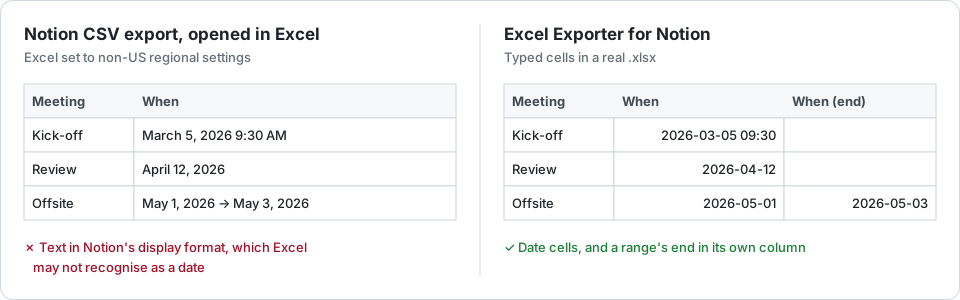
Notion’s CSV export writes dates as text in the property’s display format, such as “March 5, 2026”, so Excel may not sort, filter or subtract them. A formula property or Power Query converts them for free; the exporter writes date cells in the first place.
Why they arrive as text
A CSV has no date type. Notion writes each date the way the property displays it, and Excel guesses on opening. Whether it recognises “March 5, 2026” depends on your computer’s regional settings: on a European machine it often stays text, and a short date such as 03/05/2026 can come back as the 3rd of May. Text dates sort alphabetically, and a date range arrives as both dates in one cell.
Free fix 1: an ISO date formula
Add a formula property that writes the date in a form every Excel reads, then export with it:
formatDate(prop("Due"), "YYYY-MM-DD")
Use "YYYY-MM-DD HH:mm" to keep the time, and dateEnd(prop("Due")) inside the same formula for the end of a range. The catch: one extra property per date, in every database you export.
Free fix 2: Power Query
In Excel, Data → From Text/CSV → Transform Data. Select the date column, then Change Type → Using Locale, and choose Date with the locale Notion wrote it in, such as English (United States). The catch: it is set up per file, and a fresh export means pointing the query at the new file.
What the exporter writes
- A date cell formatted
yyyy-mm-dd, oryyyy-mm-dd hh:mmwhen the property includes a time. It is a date either way, so you can change its display in Format Cells. - A date range as two date cells: the start in the property’s column and the end in a second column named after it, “Due (end)”. If you would rather read the range, choose one text cell reading “start → end” instead.
- Times as the wall-clock time Notion shows you. A spreadsheet cell has no time zone, so the digits are what matter. Created time and last edited time are written in UTC, which is how Notion reports them.
- Date formulas and date rollups as date cells too.
Try it on your own database
Free for up to 100 rows. No credit card. You choose which pages and databases to share on Notion’s consent screen.
Questions
Why does Excel show my Notion dates as text?
Because the CSV stores them as text in Notion’s display format, and Excel only converts text it recognises under your regional settings. Anything else stays text and sorts alphabetically.
How are date ranges exported?
By default the start goes in the property’s column and the end in a second column named after it with “(end)”, both real dates. You can choose one text cell reading “start → end” instead.
What time zone are the times in?
The time Notion shows for the date, as a wall-clock time, because an Excel cell has no time zone. Created time and last edited time are in UTC.