Export Notion rollups and formulas to Excel
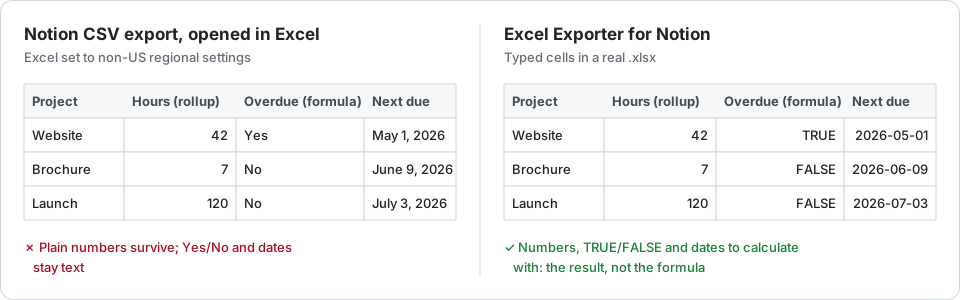
Neither Notion’s CSV nor this exporter turns a Notion formula into an Excel formula: both write the result. The difference is the type. The CSV writes the text Notion displays; the exporter writes a number, a date or TRUE/FALSE that Excel can calculate with.
What the CSV writes
Each formula and rollup cell holds what Notion displays, as text, and Excel guesses its type on opening. A plain number usually survives. A checkbox formula arrives as “Yes” or “No”, a date as text in the display format, and a value formatted as a currency or a percentage depends on your regional settings. A rollup that shows the original values is a list in one cell. Some users also report rollup columns arriving empty.
The free workaround
Convert column by column in Excel: VALUE or Text to Columns for numbers, DATEVALUE for dates, and a find-and-replace from Yes and No to TRUE and FALSE. Or rebuild the formula in Excel from the exported columns, and keep the two formulas in step from then on.
The catch: every step is repeated on every export.
What the exporter writes
- A number formula, or a rollup such as a sum, an average or a count, as a number cell.
- A date formula or a date rollup as a date cell.
- A checkbox formula as TRUE or FALSE, and a text formula as text.
- A rollup that shows the original values as those values joined with commas: related titles, option names, dates. Rollups over more than 25 related pages are read in full rather than cut short.
Always the result as Notion computed it at the moment of the export, never an Excel formula: Notion’s formula language has no Excel equivalent to translate into, and a formula that refers to other databases has nothing in the sheet to point at.
Two honest limits
Notion’s API returns a formula’s or a rollup’s value but not the display format chosen for it, so a formula shown as a currency arrives as a plain number: format the column once in Excel. Number properties do keep their format.
When Notion itself cannot evaluate a formula or a rollup, it returns no value. The column is then left empty and the export says so in its warnings, rather than writing something wrong.
Try it on your own database
Free for up to 100 rows. No credit card. You choose which pages and databases to share on Notion’s consent screen.
Questions
Do Notion formulas become Excel formulas?
No. The export writes each formula’s result at the moment of the export, typed as a number, a date, TRUE or FALSE, or text. Notion’s formula language has no Excel equivalent to translate into.
Why is my formula column not formatted as a currency?
Notion’s API returns a formula’s value but not the display format chosen for it, so the number arrives unformatted. Number properties keep their currency, percentage and thousands formats.
What happens when Notion cannot calculate a rollup?
Notion then returns no value, so the column is left empty and the export lists a warning for it, rather than writing a wrong value.