Export a Notion CRM to Excel
A Notion CRM is usually three linked databases — contacts, companies and deals — and the CSV export turns every link between them into a URL. For a quick list, export one view and clean it up in Excel; for a file you can hand to someone, export the links as names.
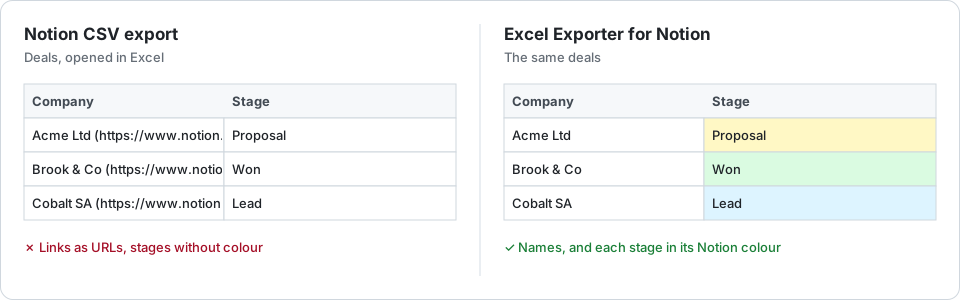
The free route
Open the view you need — “Open deals”, say — and choose ••• → Export → Markdown & CSV. Contacts, companies and deals are three databases, so that is three exports. Then, in Excel:
- The company on each deal reads “Acme Ltd (https://www.notion.so/…)”. A find-and-replace strips it; the relations guide shows how.
- Deal values can arrive with their currency symbol, as text that SUM skips.
- Stages lose their colours, and the deal owner is a name without an email.
For a one-off list of names and stages, that is enough.
A CRM export that reads like one
With Excel Exporter for Notion, pick the Deals view and export:
- Company and contact columns hold names, and can link back to the Notion page.
- Deal values stay numbers in their Notion currency format, so totals and pivots work.
- Stage and status keep their Notion colours as cell fills.
- The owner can carry their email, in the same cell or a column of its own.
- Email addresses, websites and phone numbers are clickable.
On Premium, the linked Contacts and Companies databases can join the deals as sheets of the same workbook, and a saved preset re-runs the whole export next week in one click.
A CRM holds personal data. The connection is read-only, the export runs in Zürich, Switzerland (Google Cloud europe-west6), and the file deletes itself after 7 days.
Try it on your own database
Free for up to 100 rows. No credit card. You choose which pages and databases to share on Notion’s consent screen.
Questions
Can I export contacts, companies and deals into one file?
On Premium, yes: the related databases become sheets of the same workbook. The free plan writes one sheet per file, so it is one export per database.
Will the company on a deal show as a name?
Yes. Relations are written as the related pages’ titles. You can keep a link back to Notion on the cell, or put the page IDs in a separate column.
Can the export include people’s email addresses?
Yes, if you choose it: next to the name in the same cell, or in a column of its own. By default only names are written.